Mobile Number Locator& Tracker
- 4.3
- Rating
- 1.00M
- Installs
- Free
- Price
 Analysis by App-foxy
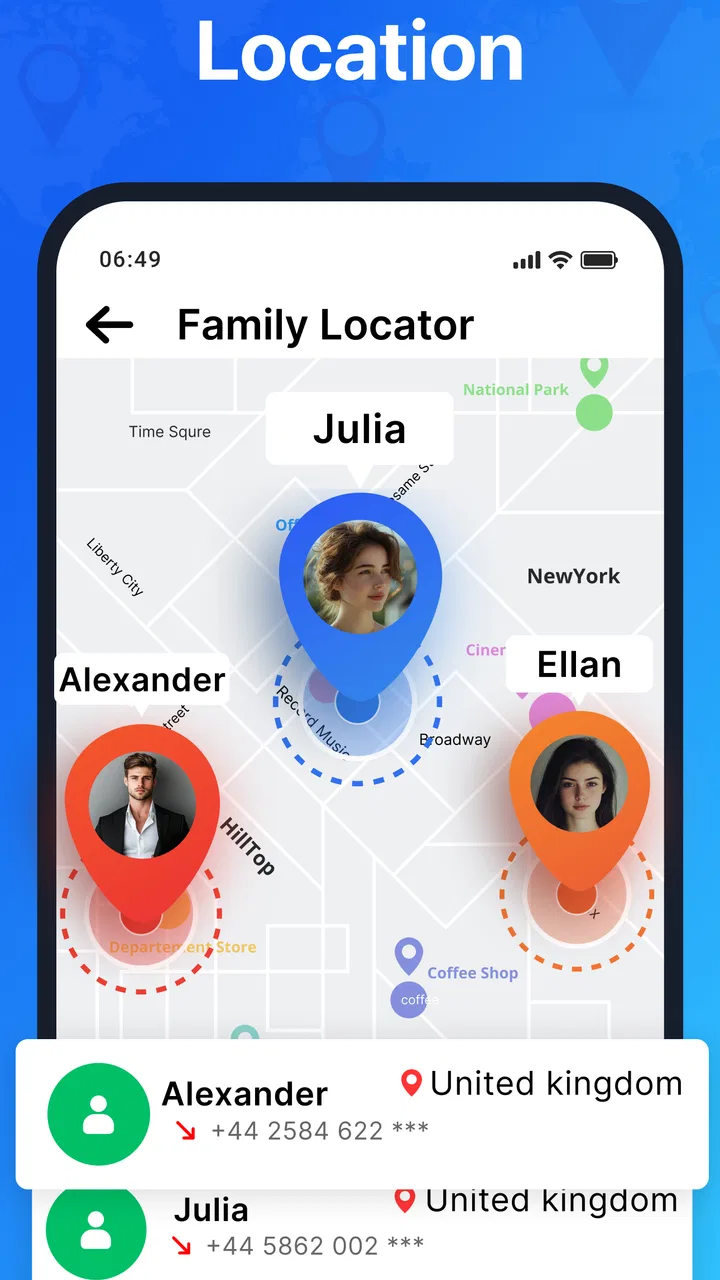
Mobile Number Locator & Tracker caught my attention because it combines two jobs people often handle separately: investigating an unfamiliar caller and keeping an eye on a family member’s location. After using it as a Maps & Navigation app, I found that its appeal is strongest during the first few days, when an unknown number or a new travel routine makes the idea of a single place for these tools feel genuinely convenient. The harder question is whether it deserves a permanent place on your phone once the initial curiosity disappears.
My short answer is that it can, but only for a particular kind of user. It is most useful when you regularly receive calls from numbers you do not recognize or when your household has a clear, practical reason to share locations. It is less convincing as a general-purpose navigation replacement, and it should not be treated as a guaranteed way to identify every caller or pinpoint every person perfectly. That distinction matters more than the attractive simplicity of the store summary.
How the first week feels in everyday use
The first-week experience is easy to understand. You open the app with a question in mind: who called me, where is a family member, or how can I check a shared location without jumping between unrelated tools? That directness gives Mobile Number Locator & Tracker a useful advantage over apps that bury their main purpose under dashboards, news feeds, or complicated route-planning menus.
You May Also Like

 Blood Strike: 2.5 Anniversary
Blood Strike’s Loadouts Turn Every Drop Into a Tactical Gamble
A close look at Blood Strike’s custom loadouts: how fast access to signature weapons reshapes its battle royale rhythm, rewards preparation, and narrows the gap between fights.

 Pandora - Music & Podcasts
Pandora’s Music Is Easy to Start, but Harder to Recover
Pandora’s strength is its low-effort path from a seed to a station. Its weak spot is how much confidence it asks you to place in connection, setup, and quiet recovery.

 8 Ball Pool
 Is Built on Rivalries, Rematches, and Routine
A close look at the rivalries, rematches, shared routines, and unanswered safety questions that turn a quick pool match into a persistent mobile community.

 Samsung Music
’s Quiet Strength Is Playing What You Already Own
Its reach comes less from spectacle than from dependable access to a personal library. That simplicity is both the app’s strongest retention engine and its ceiling.

 AccuWeather: Weather Radar
AccuWeather Review: A Quick, Clear Forecast for Everyday Decisions
For everyday plans, the best forecast is the one you can understand quickly. AccuWeather makes rain timing, radar, and local conditions easy to act on, with a few trade-offs.

 Hill Climb Racing
Why Hill Climb Racing Still Turns Crashes Into One More Run
A tiny car, a bumpy hill and one more upgrade: Hill Climb Racing keeps resurfacing because its simple chaos makes every near-miss feel personal.
More From Our News Desk



I would begin with one narrow task rather than trying to use every function immediately. If unknown calls are your main concern, test it with numbers you already recognize and compare the result with your own contacts. If family location is the reason you installed it, agree on a simple routine first: who shares, when location sharing is expected, and what everyone should do if a phone is offline or the location looks old. This small bit of preparation prevents the app from becoming a source of unnecessary worry.
The app comes from CostcoLogics Apps and belongs to the Maps & Navigation category. It is free to install, which makes trying the basic experience relatively low-risk, although optional purchases range from $1.49 to $31.99 per item. I would not make a purchase during the first session. Spend enough time deciding whether the lookup and family-location workflow actually fits your household before paying for anything that may only feel exciting because it is new.
One practical scenario shows where it makes sense. Imagine that a parent is waiting for a teenager to arrive after an activity, while the teenager is travelling through an unfamiliar area. A shared-location check can answer a simple question without repeated calls. Later, an unfamiliar number appears on the parent’s phone. The lookup side offers a second kind of reassurance. These are modest conveniences, but they address real moments rather than trying to replace every map or communication app you already use.
The first week is also when I noticed the importance of expectations. A phone-number locator is not the same thing as a live identity database, and a family tracker is not the same thing as continuous supervision. Results can depend on the number, the device, connectivity, and whether location sharing is active. I would use the app as an aid to a conversation, not as proof that a caller is trustworthy or that a person is safe simply because a map marker appears.
What makes the initial appeal different from ordinary maps
Traditional map apps are excellent when I need directions, traffic information, nearby places, or a route. They are not usually designed around the moment when I ask, “Who is behind this number?” Mobile Number Locator & Tracker has a more focused identity: it brings caller investigation and family location into one utility. That combination is the reason to try it, not turn-by-turn navigation.
Compared with a dedicated family-sharing service, its attraction is convenience. I do not need to think of the app only as a map with a pin; I can also approach it from the phone-number side. The trade-off is that a specialist family app may offer a deeper set of household controls, while a standard caller-identification tool may be more focused on screening calls. If either of those is your only need, a dedicated alternative may feel cleaner over time.
The app is rated for Everyone, and its audience is broad enough to include people who are not especially technical. Even so, an age rating does not remove the need for sensible family boundaries. I would explain location sharing clearly to every person involved, especially younger users, and make sure nobody assumes that installing the app automatically creates a reliable safety system.
Three habits that improve the trial
First, keep a small note of what you were trying to verify when you used the lookup feature. This sounds excessive, but it helps you notice whether the app solves a recurring problem or whether you are opening it mostly out of curiosity. A tool that answers one useful question every few weeks may be worth keeping; a tool that encourages constant checking may not be healthy or necessary.
Second, establish a location-sharing rule that has an end point. For example, share during a journey or while attending an event, then stop when the situation is over. This is more sustainable than leaving every person visible indefinitely. It also makes the app’s value easier to judge because you can see whether temporary sharing is enough for your real life.
Third, treat unfamiliar caller results as a prompt for caution, not a final verdict. Do not return a suspicious call merely because a label looks familiar, and do not accuse a legitimate contact because a lookup is incomplete or unclear. The app can support your decision, but blocking, reporting, or ignoring a number still requires your own judgment.
What remains useful after the novelty fades
After the first month, the question changes from “What can this app do?” to “When do I genuinely need it?” That is where the lasting value becomes more limited but also more honest. Most people do not need to inspect phone numbers every day. Family location is similarly occasional for many households, usually connected to commutes, trips, appointments, or meeting points.
For me, the strongest recurring value comes from repeatable situations rather than constant tracking. A family member travelling alone may want a quick location check during a journey. Someone managing calls for a small household may appreciate having a dedicated place to investigate unknown numbers. People who frequently change phones or receive calls from unfamiliar local numbers may also find the lookup function more relevant than someone whose contacts are already well organized.
The app’s current version is 1.2.92, and it has passed the early-adoption stage in a meaningful way: more than a million installs and an average rating of 4.3 from roughly sixty-nine thousand ratings show that it has attracted a substantial audience. I read those figures as evidence of broad interest, not as proof that every lookup or location result will work for every person. Ratings can confirm that an app is worth examining; they cannot replace a trial with your own contacts and routines.
Month-to-month value depends heavily on whether the app reduces friction. If you repeatedly move between a caller tool, a family-sharing service, and a map, combining two related tasks may save time. But if your phone already handles unknown callers well and your family uses an established location-sharing system, adding another app may create duplication instead of convenience.
This is also where I would compare it with the usual alternatives. A normal maps app remains better for route planning and exploration. A phone’s built-in caller controls may be enough for basic blocking or screening. A dedicated family-location product may be preferable when your household needs detailed schedules, alerts, or a more specialized safety workflow. Mobile Number Locator & Tracker makes the most sense in the middle: you want both number lookup and family location, but neither task alone justifies installing a highly specialized service.
When the app earns a permanent place
I would keep it installed for a household that has a recurring, agreed use for both sides of its identity. That might mean checking unfamiliar calls during a busy workday and sharing a location during school pickups, long commutes, or occasional travel. The important point is that the app should fit an existing habit. It should not manufacture a reason to monitor people or investigate every unknown call.
There is also value in using it as a temporary tool. You might install it before a family trip, use it while coordinating several arrivals, and later decide whether the convenience justified keeping it. That approach is more realistic than assuming every utility must become a daily app. A product can be useful for specific seasons of life without being essential all year.
People who should probably skip it are those seeking professional-grade navigation, guaranteed emergency tracking, or a complete replacement for their phone’s security tools. I would also hesitate to recommend it to anyone who dislikes location sharing or feels uncomfortable with the privacy questions that come with tracking. No convenience is worth introducing a system that family members do not understand or willingly accept.
Maintenance, friction, and the reasons fatigue can set in
Keeping a location app useful requires more maintenance than installing it. Family members need to remember which phone is sharing, whether the device has connectivity, and whether the location shown is current enough to matter. Phones are misplaced, batteries run down, and people change routines. If nobody checks those practical details, a map marker can create false confidence.
I would review the sharing arrangement every few weeks rather than leaving it untouched. Ask whether everyone still needs access, whether temporary sharing should be turned off, and whether the app is being used for coordination or simply for reassurance. This is one of the less obvious costs of family tracking: the technical setup may be quick, but the social agreement needs occasional attention.
Caller lookup has its own maintenance burden. Contacts should remain organized, and you need a personal rule for how to react to uncertain results. Otherwise, the app can turn every unknown call into a small investigation. My preferred workflow is to let an unfamiliar number go unanswered when appropriate, check it only if there is a practical reason, and avoid sharing personal information until I know who is calling.
In-app purchases are another point to watch. Because the app is free but offers paid items, I would check what a purchase changes before committing. The price range is wide enough that the difference between a minor convenience and a substantial expense matters. I would not assume that paying automatically improves the accuracy of a caller result or turns location sharing into a guaranteed live safety service.
Updates can also affect long-term comfort. With any app that handles location or phone-related tasks, I want to notice changes in the interface and revisit settings after an update. The practical lesson is simple: do not configure it once and forget it. A quick monthly check is enough for most users, but skipping that check can leave old sharing arrangements active or make the app harder to understand when you need it.
Where repeated use becomes tiring
The first source of fatigue is duplication. If your phone already identifies many callers, and your family already shares location through another trusted service, Mobile Number Locator & Tracker may ask you to maintain a third workflow. The combined feature set sounds efficient, but efficiency disappears when the same people, permissions, or checks must be managed in multiple places.
The second is emotional fatigue. A location marker can be reassuring during a specific journey, yet stressful when checked repeatedly without a clear reason. The app is better used to coordinate plans than to replace communication. A quick message such as “I arrived” can sometimes provide more useful context than a map position that does not explain traffic, delays, or a change of plan.
The third is uncertainty. A number lookup can be helpful, but I would never build a serious decision on a single result. Businesses may call from different numbers, legitimate callers may not be recognized, and bad actors can misrepresent themselves. The app is a filter for attention, not a courtroom. That limitation is not a flaw unique to this product, but it becomes important when the marketing idea of “finding” sounds more definite than real-world phone data usually is.
There is a similar trade-off with family location. If everyone expects a constantly updated position, any delay can look alarming. If the household agrees that the feature is for meeting up or checking a journey, occasional imperfections are easier to handle. The best results come from limiting the purpose, not from demanding that the app answer every safety question.
My long-term verdict on Mobile Number Locator & Tracker
Mobile Number Locator & Tracker earns lasting space only when its two functions match a real routine. I like the idea of combining unknown-caller investigation with family location because it addresses two common moments without forcing me to think in terms of a full navigation platform. The free entry point makes experimentation straightforward, and its broad adoption suggests that many people find the concept useful.
Still, I would not recommend keeping it simply because it is available. If you only need driving directions, use a conventional maps app. If you need a mature family-safety system with extensive controls, compare dedicated options carefully. If you want absolute certainty about an unknown caller or continuous protection for a loved one, no ordinary utility should be treated as a substitute for judgment, communication, and appropriate emergency services.
For the right household, the app’s best quality is not constant novelty but occasional convenience. It can shorten the path from an unfamiliar call to a sensible decision, or from “Where are you?” to a quick shared-location check. To preserve that value, I would use it selectively, keep sharing temporary where possible, avoid impulsive purchases, and review the arrangement regularly.
My recommendation is therefore conditional but positive: try it if you genuinely need both reverse phone lookup and family location sharing, then judge it after several ordinary weeks rather than after an impressive first session. If it becomes part of a calm, agreed workflow, it has a reason to stay. If it mainly encourages repeated checking or duplicates tools you already trust, uninstalling it is the more sensible long-term choice.
For a free Maps & Navigation app aimed at Everyone, Mobile Number Locator & Tracker is approachable and potentially practical, but its real quality depends on disciplined use. I would keep it as a focused household utility, not as an all-purpose tracker or navigation replacement. That is a narrower recommendation than the initial promise, yet it is also the reason I can see it remaining useful after the novelty fades.
FAQs for Mobile Number Locator& Tracker
01What is Mobile Number Locator & Tracker used for?
Mobile Number Locator & Tracker is designed to provide general information associated with a phone number, such as its country, region, carrier, or approximate location based on available telecommunications data. It is useful for identifying unfamiliar numbers and organizing contacts, but it should not be considered a precise real-time GPS tracking tool. Results can vary depending on the number, carrier, and information available in the app’s database.
02Can Mobile Number Locator & Tracker show someone’s exact real-time location?
No. The app cannot normally reveal another person’s exact real-time GPS location simply by entering their phone number. Accurate location sharing requires the person’s consent and usually depends on device permissions, an active internet connection, and a dedicated location-sharing service. Number-based results are generally approximate and may identify a country, area, or network rather than a person’s current physical position.
03Does the app work with international phone numbers?
Mobile Number Locator & Tracker may support numbers from multiple countries, but its coverage and accuracy can differ significantly by region. You may need to enter the number in the correct international format, including the country code. Some virtual, private, recently transferred, or unlisted numbers may return limited, outdated, or incorrect information because carrier databases are not always complete or updated immediately.
04Is Mobile Number Locator & Tracker free to download and use?
The app may be available as a free download, although certain features can include advertising, usage limits, subscriptions, or optional in-app purchases. Before using advanced tools, review the pricing details shown on the official Google Play Store or Apple App Store listing. Also check the subscription terms carefully, especially trial periods and automatic renewal conditions, to avoid unexpected charges.
05Is it safe and legal to use a mobile number locator app?
Using the app to identify general information about a number is usually acceptable when done responsibly, but privacy laws and telecommunications regulations vary by country. You should not use it to harass, monitor, stalk, or identify someone without permission. Review the app’s privacy policy, limit the personal information you provide, and remember that search results should not be treated as verified evidence of a person’s identity or location.
Pros
- Quickly identifies the country and carrier linked to a phone number.
- Simple interface makes basic number searches easy for most users.
- Useful for checking unfamiliar international numbers before calling back.
- May display approximate regional information without requiring technical knowledge.
- Search results can help organize and recognize contacts more efficiently.
Cons
- It cannot provide a caller’s exact real-time location.
- Results may be outdated
- incomplete
- or inaccurate for some numbers.
- Many features may depend on an internet connection and database coverage.
- Frequent ads can interrupt searches and reduce the overall user experience.
- Privacy policies and permissions should be reviewed before entering phone numbers.

Mobile Number Locator& Tracker
Gallery